
Transforming Event Discovery: UX Strategy for an Interactive Events CalendarAt the time of writing this I work for a Pension Fund that offers services to the Episcopal Church. My team is currently involved in a multi-year corporate project to refresh our public facing website. The most recent stage of the project, which launched in Q4 2026, was to refresh our online learning experience, taking a look at how we categorize, organize and deliver the content. The company offers a variety of in-house eLearning, informative articles, tools, and videos with the intention helping those we serve make the most out of the various products and services we offer them.
In years past, we had backed ourselves into the corner of categorizing the content we offer based on who the content is for, which made it difficult to scale as we began offering more variety of services that could be offered to multiple types of church members. We were tasked with reorganizing the site to shift away from a role-based structure into a more goal-oriented or journey-based structure. The goal was to deliver our content based in a more natural way, focusing on what the user was trying to do, and at what stage in their life they are at.
One aspect of this content shift that was not immediately taken into account by the project planning team was how we would fit the various types of events the company offers into this new online learning structure. The company offers many both in-person and online events focused around a variety of topics, from leaving seminary school, to planning for a healthy retirement. Leaders in my team saw this as an opportunity to overhaul the online event discovery process, seeking not to try to exclusively fit these events into this new learning structure, but give all events a new and centralized home on the website. z
the problemThere was no centralized location for a user to go to on the website to find information about upcoming events. Users were having to go to a variety of different sections within the site to find what events were happening and where, and it was difficult to explore events in a variety of topics. There was also no consistent component style for presenting events on our webpages, which was not ideal for the user experience. Finally, there existed a library of past event recordings and slide decks that we needed to archive and allow users easy access to in case they missed the live event.
the SolutionCreate a central location for a variety of users to explore upcoming and past events. This centralized location has to be useful regardless of what type of user is exploring it and what category of event they are looking for.
There also must be a consistent component developed for presenting an event on another webpage. Events also need to be featured alongside other types of content in what we are calling ‘Topic’ pages, which are library/repositories for different types of content surrounding a specific topic. This requires topics to fit into the back end system that allows for these pages to be populated and the content of these pages to be properly tagged to allow for categorization.
Bonus:
I was also able to lead the development of a new block that I am calling the ‘Calendar Widget’, that allows for a miniature and scaled down version of the event calendar information to be pulled onto another webpage. This would be useful for the different landing pages we have around the site, and would allow for not only a feed of upcoming events that could be filtered to a specific topic, but also would allow for a featured event callout section.
my roleLead UX Designer – Supporting Role as Solutions Architect
goals & ConstraintsGoals
Improve event discoverability and enrollment rates
Support event filtering by event type (in-person vs online and event topic. This would require the ability for our Content Management System to allow for a backend tagging system
Create a scalable structure
Allow for easy access to historical event information
Constraints
CMS limitations: there was no existing CMS tagging structure in place, there was also no architectural system in place to manage the event’s and allow for simple event adding to calendar, calendar widget, webpage content, etc.
This was all added onto to existing project scope, so it had to be squeezed into the leftover developer bandwidth
my processStep 1: Comparative Research
I spent time researching how various companies presented their event calendars. I focused on other non-profits and arts organizations, whose intents in promoting events was less profit-oriented, and more focused on letting users find events based on topics of their interest. I also assessed how enterprise software companies handled the tagging and organization of events within their calendars. This would help me advise on how we would architect the system.
Step 2: Stakeholder Interviews
Meet with company stakeholders, including Education Strategy, Events Management, and External Communications teams. I needed to fully understand not only the full gamut of what types of events are offering, but also the various user segments and how the events cater to them. I would also use the various team stakeholders knowledge variety to understand what pain points we were trying to solve with this feature development.
Step 3: Sketching/Wire Framing & Iterating
The early ideas I was sketching out had a sort of google calendar feel, where the user could take a top down approach at a monthly, weekly, and daily view of upcoming events. In early iterative conversations with my project teammates, we decided that approach was not optimizing discoverability and exploration. The design felt too much like a place where a person might want to manage their own personal calendar, and not like a place they are encourage to explore outside of their comfort zone. We shifted towards a calendar feed, with the goal of not overwhelming the user up front, while giving them the opportunity to filter and explore simply.
Step 4: Backend CMS Architecture
As previously mentioned, developing the event presentation was only the tip of the iceberg. With each step in this project we are trying to improve the efficiency of our CMS, and lessen the load on our Content Management team. This required us to develop a two-part tagging system for events, that would allow for organization based on Event Type and Event Topic. We also developed a CMS system that would allow for a singular source of truth in a sense. This would allow our content managers to automate the event population when creating or editing an event in the CMS, and also tie into a drag and drop block development system that allows for event instances to easily be placed on various page types as featured blocks without having to repopulate the content.
Step 5: Development and QA Testing
Final step was to write up the requirements for the front end development and also the CMS back end changes that would be required to create this system. I worked closely with our Technical Solutions team to audit the technical requirements I wrote that would then be shared with the developers. Once the developers received the requirements alongside the wireframes/prototypes I built, it was quickly on to the QA team to proof the work. With some light iteration, the development was completed and the new features were back in my teams hands for UATesting. We made sure to loop back in department stakeholders to allow for final approval before we sent off for launch.
the final product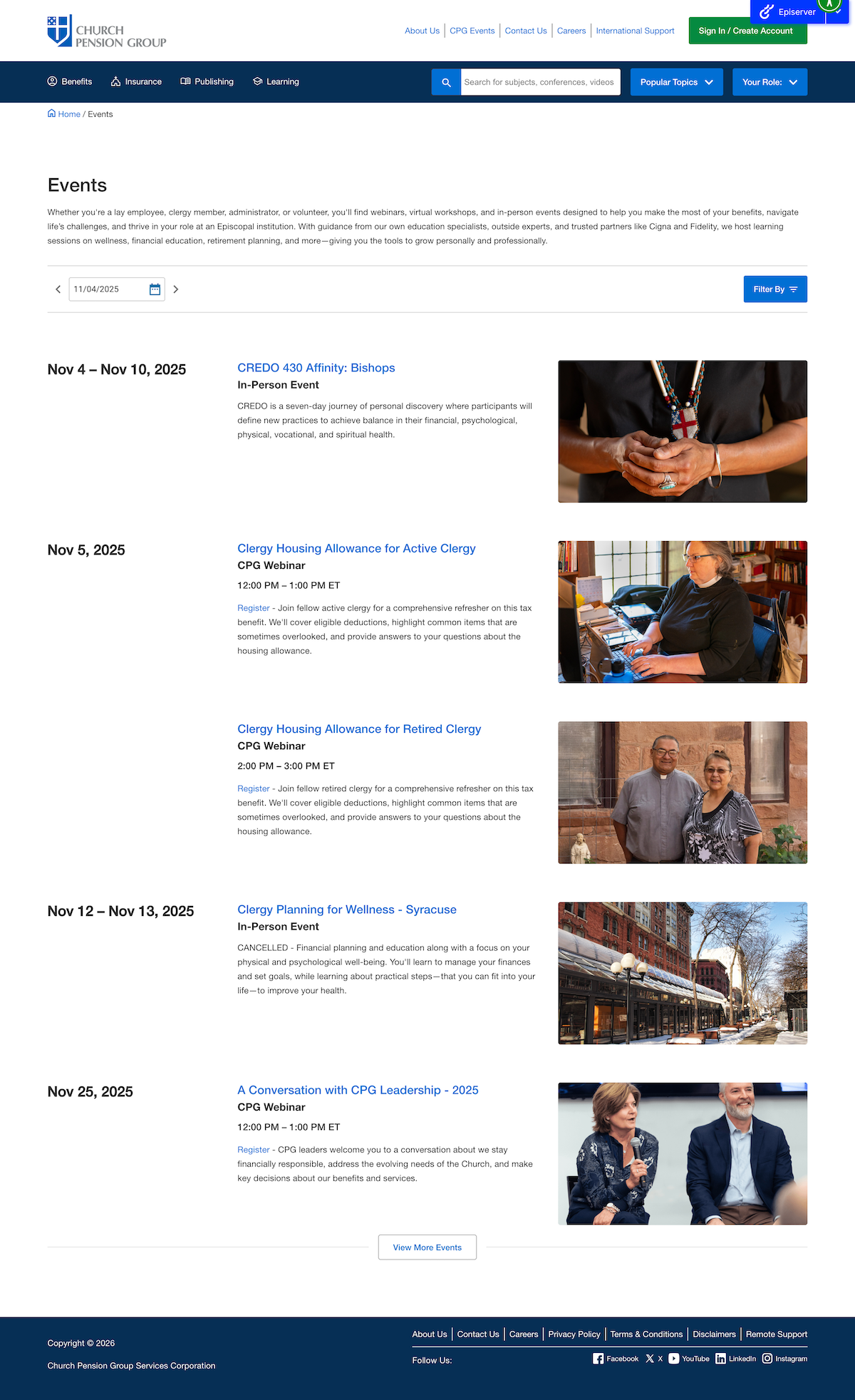
Full Events Calendar
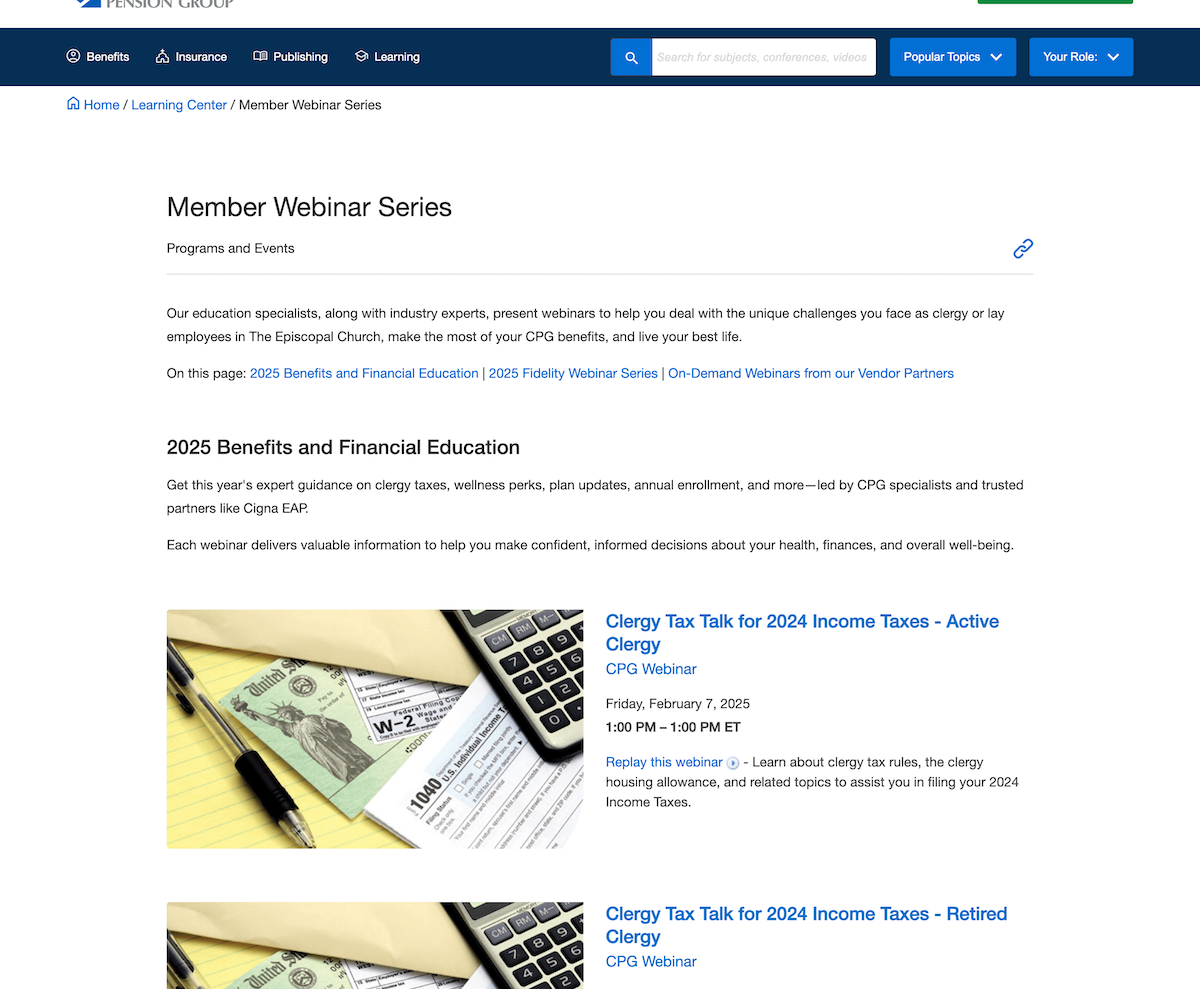
Calendar Widget, allows for pre-filtering and custom featured event
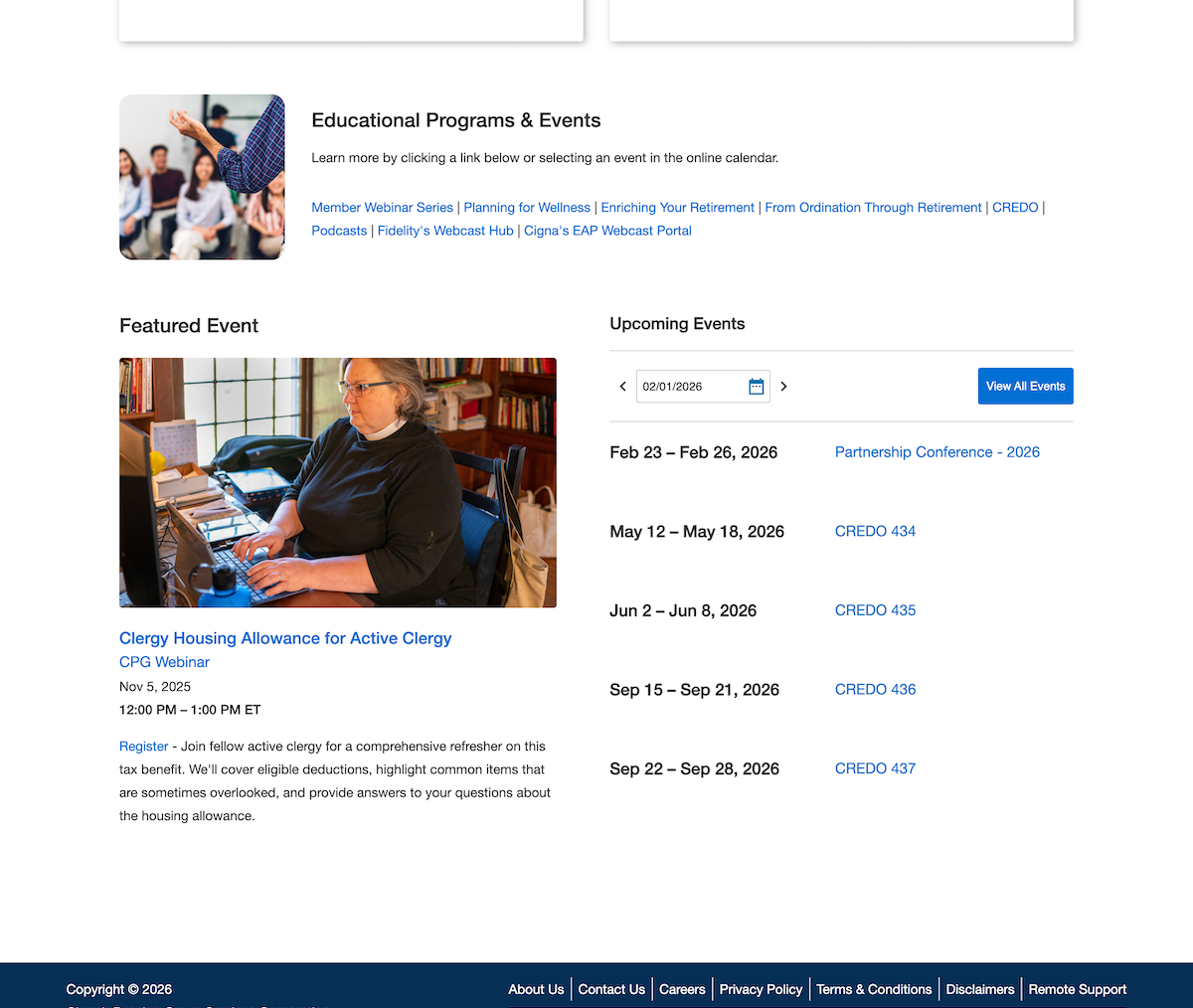
Event block when placed on another webpage.
Notice how all instances of an event had to use the same backend data, including image, title, subtitle, category, time/date, registration or replay information, and description. This formulaic approach allows for our simple management system and automated content population.
reflectionThe events calendar has launched with wide praise from not only our departmental stakeholders but also from our users. For example, we received praise from one church administrator stating how easily they were now able to plan out the rest of their year while also discovering a local event series that they had not known about. My work was also praised for my ability to go outside of my standard responsibility to develop a frontend system in my working with the content managers to architect a scalable solution that we can grow other parts of the site into.
In the next stage of this larger corporate project I am being brought more into the conversation in not only a UX role, but also as an advisory solutions architect. I deeply enjoyed being able to solve problems on both sides of the development process.
Future Improvements
As of writing this we are about to release a UI update that better accommodates multi-day events. We are also updating the filtering system to allow for custom sorting of event filters based on the placement of the Event Calendar Widget.